

We know, that at this time of the year, your bills can be higher than they are usually. We also want to make sure they are as clear as possible. In this post I want to take you through how our bills are set up , what to look for, and how you can check that your bills are correct!
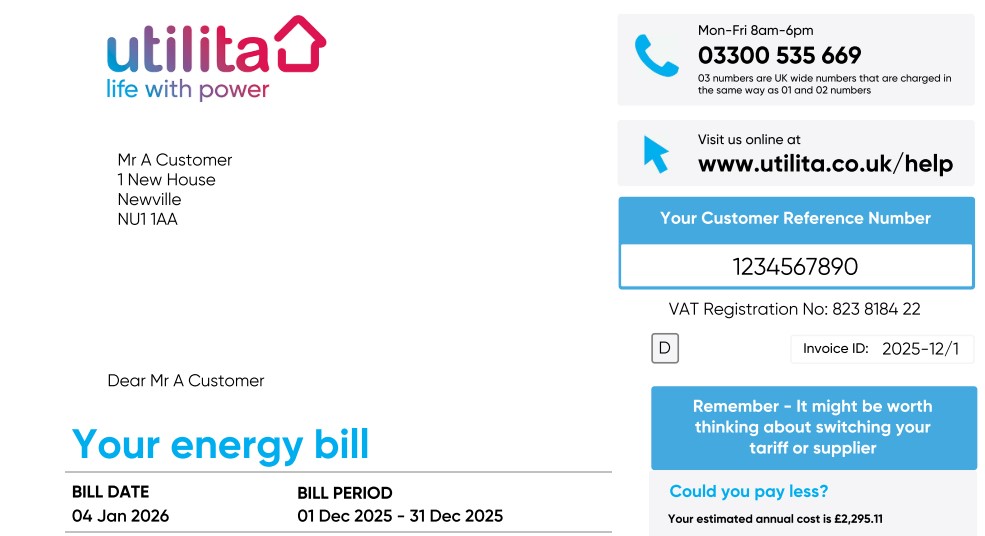
This is the front page of the bill. It will lay out all the basics you need to know about your account – the address that we are servicing, your account number, the date of the bill and the period that we are billing you for.
Sometimes the billing period may be longer than a month, if the bill has been estimated on a previous bill, and we’ve received an up to date reading, we’ll arrange to rebill your account which will ensure that you are charged only for the energy that you have used.
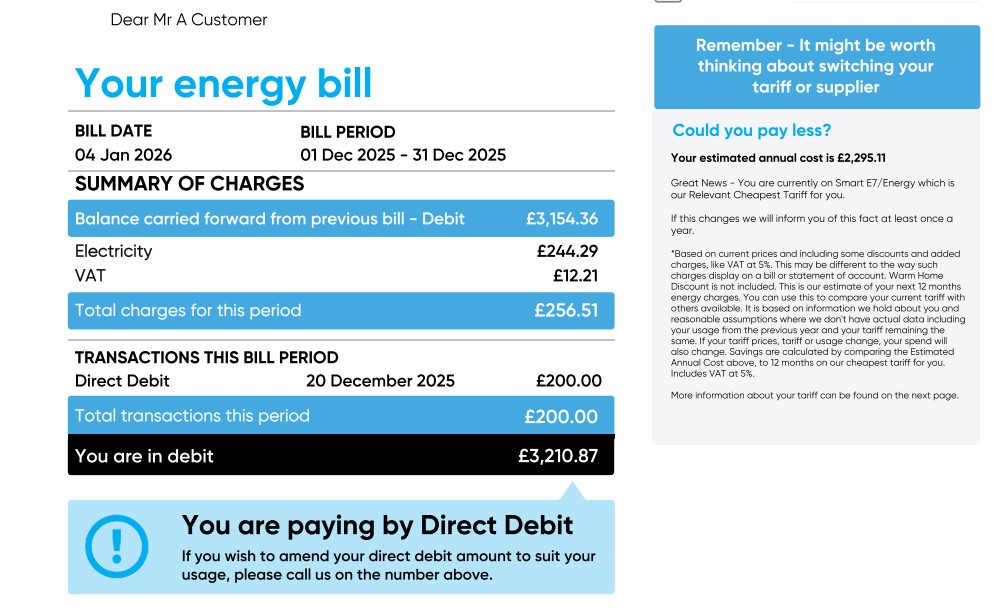
Now we’re getting to the important stuff – how much you have spent in that billing period. The bill in this example only has electricity with us – it’ll show both gas and electricity charges for the month if you have both supplies with us. It’ll demonstrate how you pay – this bill is for a Direct Debit customer, so will show any payments we have received from them in the last billing period. It’ll then show you the overall balance – whether you are in credit or debit.
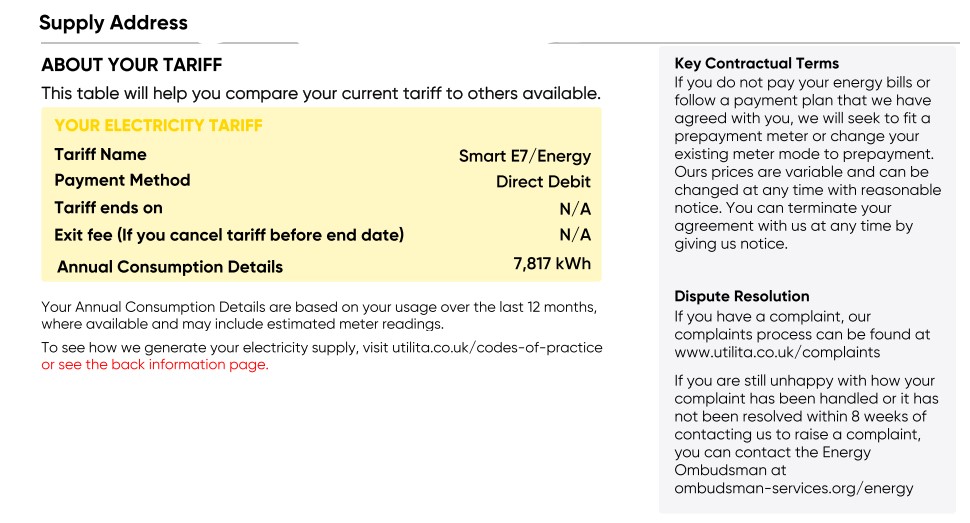
This is a breakdown of what tariff you’re on. This is useful if you’re looking at comparing your energy usage online, or if you’re trying to find the best tariff to be on. It shows the name of your tariff and your payment method.
The tariff end date only applies to certain commercial tariffs. The last figure shown is your annual consumption for the previous 12 months; this will factor in estimated readings if we have not received a reading from you. This figure will tell you what you have used – and you can check online to see how you compare against the average based on the type of property you live in, and how many people live with you.
Again, if you have a gas supply, you’ll also have your gas information below as well.
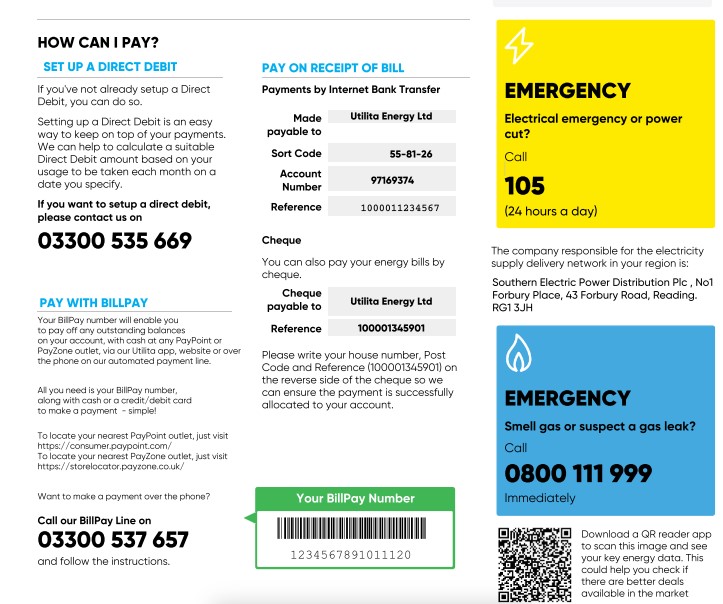
We have several options on how to pay – most people pay by Direct Debit, but some customers choose to pay on the receipt of their bill. If you pay this way, there are two options on how to do this – either by bank transfer, in which case we’ll provide bank details and a unique payment reference, so that the payment will be credited onto your account easily, or we can provide customers a BillPay card. This means that you can pay online, over the phone or at a PayPoint, in a similar way to topping up via our pay as you go options.
This option is useful if you’re moving from pay as you go to a credit tariff. This page also gives you details on who to contact if you have an emergency such as a power cut, or if you smell gas .
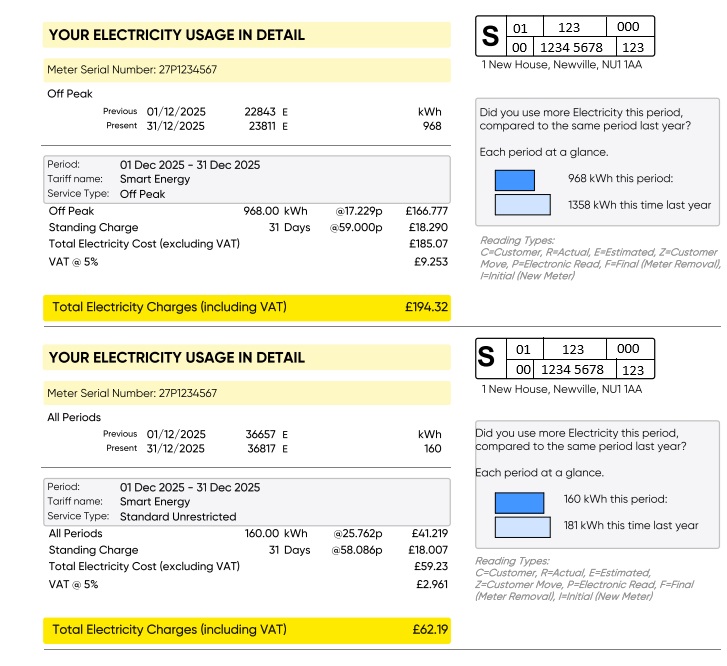
This is the bit where things can sometimes be more difficult to understand!
This page will give you information about your usage – it lays out the technical elements of your meter in two parts – firstly your MSN (Meter Serial Number) in yellow at the top – this is the physical meter’s identity and is critical to making sure that the meter we are billing against is correct. The other part is in the box to the right – this is known as an MPAN (Meter Point Access Number) for electricity, and MPRN (Meter Point Reference Number) for gas. This is effectively your meter’s “address”. By having this, it makes life easier for both an engineer who is attending your property, and the energy supplier you are with to identify the property – there can be times where properties can have very similar addresses, so these reference numbers are important.
Underneath the meter serial number, you’ll see your readings. This will have the date the reading was taken, and whether it was an Estimated Reading (which is an E), a Customer Reading (which is a C), or a Routine or Automatic Meter Readings (which is an R). If you see an estimated reading, it is important that you send us a meter read through the app or on our website. This ensures we are billing you only for the energy that you have used.
Every 3 months there will also be an estimated read applied to your meter automatically on the 1st of the month – this is known as a “Check Reading”, and is applied on the day that your prices change – this happens on the 1st January, 1st March, 1st July and 1st October every year, so if you see these readings, don’t panic – they’re normal!
Underneath these readings you’ll see the workings out of how your bill has been calculated – very simply, it’s the amount of energy used between the two reads, multiplied by your tariffs unit rate, followed by the standing charge costs for that month. Finally, we’ll also add VAT, which for energy bills is calculated at 5%.
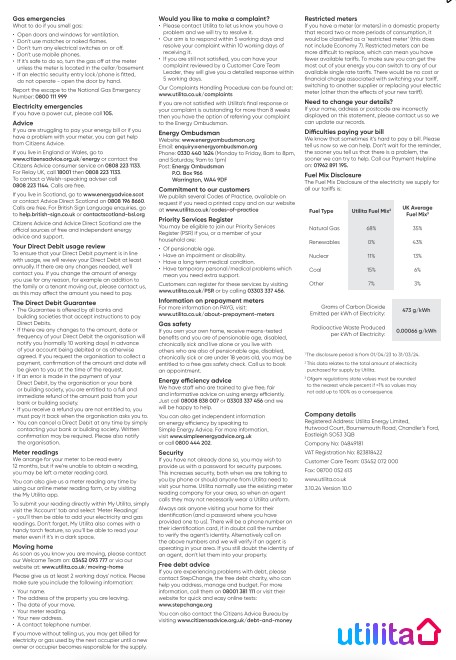
Finally, we have the last page – this is all the relevant T’s & C’s about having an account with us. It gives you a breakdown on how to move home, how to manage debt if you have any on your account , how to join the Priority Services Register, and information about The Direct Debit Guarantee amongst many other things!
Thanks for reading! I hope this has been useful and interesting for you, please let me know if you have any questions at all, and I’ll be happy to answer them! We’d also love to hear about what else you’d like us to do a deep dive on – what can we do to make navigating the energy industry easier for you? Let us know in the comments!
PAGE ONE – OVERVIEW
This is the front page of the bill. It will lay out all the basics you need to know about your account – the address that we are servicing, your account number, the date of the bill and the period that we are billing you for.
Sometimes the billing period may be longer than a month, if the bill has been estimated on a previous bill, and we’ve received an up to date reading, we’ll arrange to rebill your account which will ensure that you are charged only for the energy that you have used.
Now we’re getting to the important stuff – how much you have spent in that billing period. The bill in this example only has electricity with us – it’ll show both gas and electricity charges for the month if you have both supplies with us. It’ll demonstrate how you pay – this bill is for a Direct Debit customer, so will show any payments we have received from them in the last billing period. It’ll then show you the overall balance – whether you are in credit or debit.
PAGE TWO – YOUR TARIFF
This is a breakdown of what tariff you’re on. This is useful if you’re looking at comparing your energy usage online, or if you’re trying to find the best tariff to be on. It shows the name of your tariff and your payment method.
The tariff end date only applies to certain commercial tariffs. The last figure shown is your annual consumption for the previous 12 months; this will factor in estimated readings if we have not received a reading from you. This figure will tell you what you have used – and you can check online to see how you compare against the average based on the type of property you live in, and how many people live with you.
Again, if you have a gas supply, you’ll also have your gas information below as well.
We have several options on how to pay – most people pay by Direct Debit, but some customers choose to pay on the receipt of their bill. If you pay this way, there are two options on how to do this – either by bank transfer, in which case we’ll provide bank details and a unique payment reference, so that the payment will be credited onto your account easily, or we can provide customers a BillPay card. This means that you can pay online, over the phone or at a PayPoint, in a similar way to topping up via our pay as you go options.
This option is useful if you’re moving from pay as you go to a credit tariff. This page also gives you details on who to contact if you have an emergency such as a power cut, or if you smell gas .
PAGE THREE – COST BREAKDOWN
This is the bit where things can sometimes be more difficult to understand!
This page will give you information about your usage – it lays out the technical elements of your meter in two parts – firstly your MSN (Meter Serial Number) in yellow at the top – this is the physical meter’s identity and is critical to making sure that the meter we are billing against is correct. The other part is in the box to the right – this is known as an MPAN (Meter Point Access Number) for electricity, and MPRN (Meter Point Reference Number) for gas. This is effectively your meter’s “address”. By having this, it makes life easier for both an engineer who is attending your property, and the energy supplier you are with to identify the property – there can be times where properties can have very similar addresses, so these reference numbers are important.
Underneath the meter serial number, you’ll see your readings. This will have the date the reading was taken, and whether it was an Estimated Reading (which is an E), a Customer Reading (which is a C), or a Routine or Automatic Meter Readings (which is an R). If you see an estimated reading, it is important that you send us a meter read through the app or on our website. This ensures we are billing you only for the energy that you have used.
Every 3 months there will also be an estimated read applied to your meter automatically on the 1st of the month – this is known as a “Check Reading”, and is applied on the day that your prices change – this happens on the 1st January, 1st March, 1st July and 1st October every year, so if you see these readings, don’t panic – they’re normal!
Underneath these readings you’ll see the workings out of how your bill has been calculated – very simply, it’s the amount of energy used between the two reads, multiplied by your tariffs unit rate, followed by the standing charge costs for that month. Finally, we’ll also add VAT, which for energy bills is calculated at 5%.
PAGE FOUR – TERMS & CONDITIONS
Finally, we have the last page – this is all the relevant T’s & C’s about having an account with us. It gives you a breakdown on how to move home, how to manage debt if you have any on your account , how to join the Priority Services Register, and information about The Direct Debit Guarantee amongst many other things!
Thanks for reading! I hope this has been useful and interesting for you, please let me know if you have any questions at all, and I’ll be happy to answer them! We’d also love to hear about what else you’d like us to do a deep dive on – what can we do to make navigating the energy industry easier for you? Let us know in the comments!
Last edited by PeteC; 4 Hours Ago at 13:53.
I am one of your Community Managers! 😀
To post a new thread about anything you like click here
Feel free to message me any time by clicking here 🤗
